When you want to watch VR videos for more immersive cinematic experiences, you will find it difficult to transform existing video sources into lifelike VR content. This is where a powerful and efficient VR video conversion tool comes into play, and that’s exactly where VideoSolo Video Converter Ultimate comes in.
VideoSolo Video Converter Ultimate is designed to convert 2D videos into 3D VR videos, allowing users to enjoy a truly immersive viewing pleasure with formats like Anaglyph VR, Side by Side VR, and Top and Bottom VR. In the following content, we will delve into the features and usage of this converter.
Sparking Features of VideoSolo Video Converter Ultimate
VideoSolo Video Converter Ultimate is the best VR converter to change regular videos into VR format. It also offers additional functionalities to enhance the videos, making them more captivating, enjoyable, and immersive.
1. Versatile and Customized Conversion
VideoSolo is compatible with 300+ video formats like MP4, MKV, MOV, FLV, AVI, WMV, etc. All of them can be imported into the software and converted to VR videos with one click.
Besides, this top-rated program stands out by reducing the size of video files without compromising their quality. Users can tailor compression settings to achieve the best results in their preferred formats.
2. Swift Conversion in Batches
With Blu Hyper CPU technology, VideoSolo ensures high-speed conversion, transforming videos at speeds up to 30 times faster. Additionally, it allows multiple videos to be concurrently converted into VR formats, saving a lot of time for you.
3. Video Edition and Enhancement
VideoSolo introduces a video editing toolkit that empowers users to unleash their creative abilities. Video metadata like title, artist, album, and other particulars can be easily adjusted. You can also correct colours, remove noise, or apply filters to enjoy an enhanced and immersive viewing experience.
How to Use VideoSolo Video Converter Ultimate for VR Conversion
VideoSolo Video Converter Ultimate is a powerful and efficient tool for conversion, but its usage is very simple and friendly. Now let’s follow the simple steps below and convert normal video to VR for you.
Step 1: Download and Install VideoSolo
Download and install VideoSolo Video Converter Ultimate if you haven’t already. Launch the application after installation.
Step 2: Add Video Files for Conversion
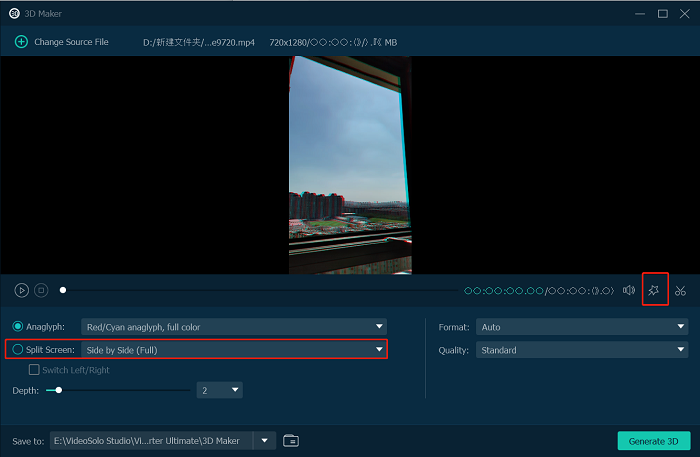
Navigate to the “Toolbox” section on the top of the interface and then select “3D Maker”. After that, click on the “+” symbol at the centre of the interface. Browse your computer’s files and import the regular video that you want to convert.

Step 3: Output Preference Setting and Editing
When the video is added to the VR video converter, tickle Split Screen, and choose the 3D mode you like. You can also edit this video by tapping the star-shaped icon in the middle of the interface, which will allow you to remove the watermark, add subtitles, crop and adjust audio quality and more.
Step 4: Start Conversion
Once you have selected the output format and configured the settings, click the “Generate 3D” button to start the conversion process. The software will begin converting your source videos into the VR-compatible format you’ve chosen.

Tech Specs of VideoSolo Video Converter Ultimate
VideoSolo Video Converter Ultimate boasts an extensive range of supported input and output file formats, encompassing various common video types. Furthermore, it is compatible with multiple device systems and hardware, providing convenience for users across different platforms.
Support Input Format: MP3, WAV, M4A, MP4, MOV, WMV, GP, 3G2, AVI, SWF, F4V, MJPG, MJPEG, MPG, MPEG, MP4, etc.
Support Output Format: MP3, WAV, M4A, H.264/MPEG-4 AVC, AVI, MPG, MPEG-1, MPEG-2, MPEG-4, H.264, FLV, MP4, etc.
3D Video Output Format: MP4 Side by Side 3D, MP4 Top and Bottom 3D, MP4 Anaglyph 3D, etc.
Operating Systems: Mac OS X 10.12 or above and Windows 11/10/8.1/8/7/Vista/XP (32 bit or 64 bit)
CPU: Win: Intel® or AMD processor, 1 GHz or faster
Mac: Apple M1 chip and multicore Intel processor with 64-bit support
The Price of VideoSolo Video Converter Ultimate
You might be concerned about whether it’s as powerful as mentioned earlier. No need to worry, the software provides a free trial version that allows basic video conversion and editing.
You can choose to use it with a free trial and access its features to gain hands-on experience with the software’s functions and assess whether it lives up to your expectations before purchase.
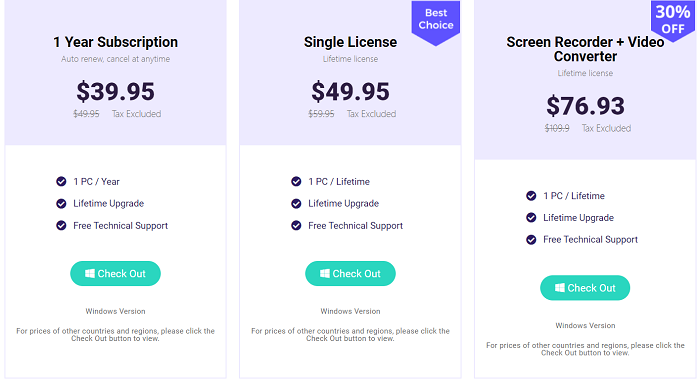
If you want to access its comprehensive and advanced functionalities, check the available plans below and choose what you want.
1-year Plan: $39.95 (cancel at any time, 1 year)
Single Plan: $49.95 (best choice, lifetime)
Screen Recorder &Video Converter Plan: $76.93 (30%off, more advanced functions)
Summary
The powerful VideoSolo Video Converter Ultimate stands out for its exceptional VR conversion capabilities, allowing users to seamlessly transform videos into immersive VR experiences.
With advanced 3D VR settings and compatibility with various VR devices, it ensures an optimal viewing experience. Give it a try! Get the free trial version and check out this special feature yourself.
Also read: Matching Identities: DNA Face Photo Test App